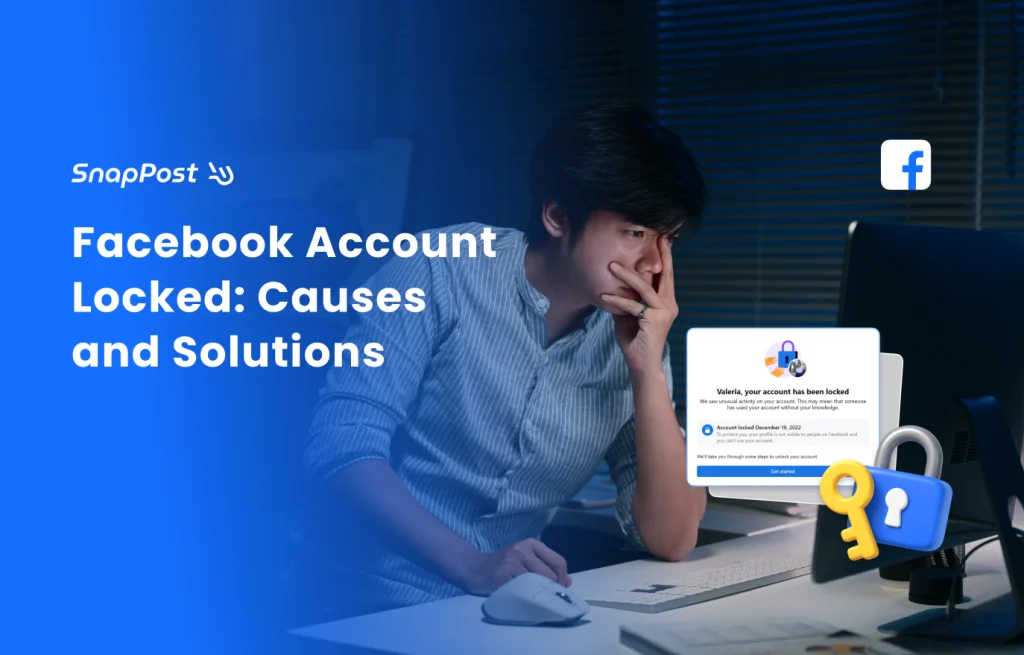
For social media managers and e-commerce entrepreneurs, a Facebook account is more than just a profile—it is an essential business tool. Discovering that your account has been locked can be devastating, your profile vanishes, and your ads and group postings come to a complete standstill.
Based on the latest 2025 Meta policies and real recovery cases, this guide will help you identify the three common types of Facebook locks, provide a step-by-step recovery manual, and share professional anti-ban secrets to keep your account safe for the long term.
Based on the latest 2025 Meta policies and real recovery cases, this guide will help you identify the three common types of Facebook locks, provide a step-by-step recovery manual, and share professional anti-ban secrets to keep your account safe for the long term.
Identify Your Situation: The 3 Types of Facebook Restrictions
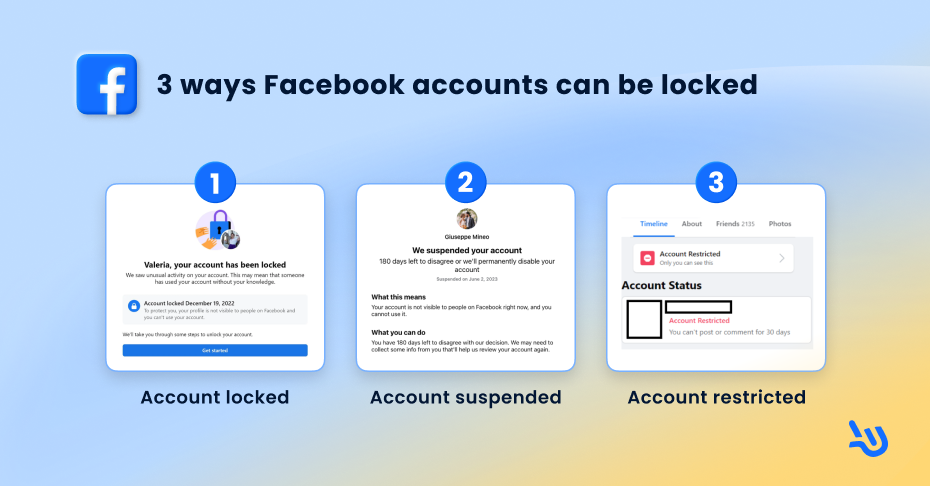
Before seeking a solution, you must identify which type of lock you are facing, as the recovery methods differ significantly:
Type 1: Account Locked
This is the most common issue. It usually occurs when the system detects “abnormal activity” (e.g., logging in from an unfamiliar IP address or frequently switching devices). To protect the account from hackers, Facebook temporarily hides your profile.
Type 2: Account Suspended / Disabled
This is a severe restriction. It typically happens due to violations of Community Standards (e.g., prohibited content, copyright infringement, or frequent reporting by other users). If you do not appeal promptly, the account may be permanently deleted.
Type 3: Feature Limits (Account Restricted)
You can still log in, but you cannot post in groups, comment, or “Like” posts. This happens when your behavior is flagged as “Spam,” such as sending too much repetitive content in a short period.
Step-by-Step Recovery Guide
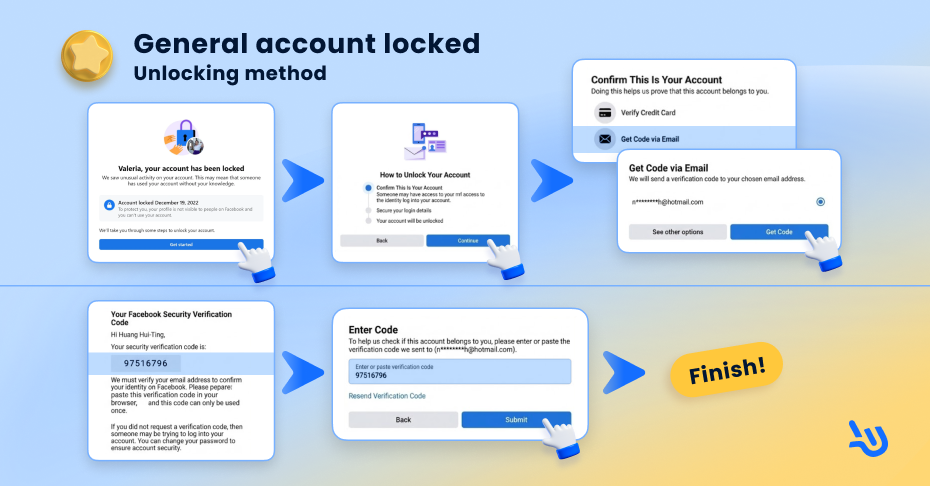
How to solve "Account Locked"?
When your screen says “Your account has been locked,” follow these steps:
- Get Started: Click the “Get Started” button to begin the appeal process.
- Identity Verification: Facebook will ask for proof of ownership. Common methods include:
- Email Code: Receiving an 8-digit verification code via your registered email.
- Credit Card Verification: If you have an active Ad Account, you may verify via your payment info.
- Secure Login Details: Review the associated email and phone number; remove any unfamiliar contact info.
- Recovery: Once approved, your account access will be restored immediately.
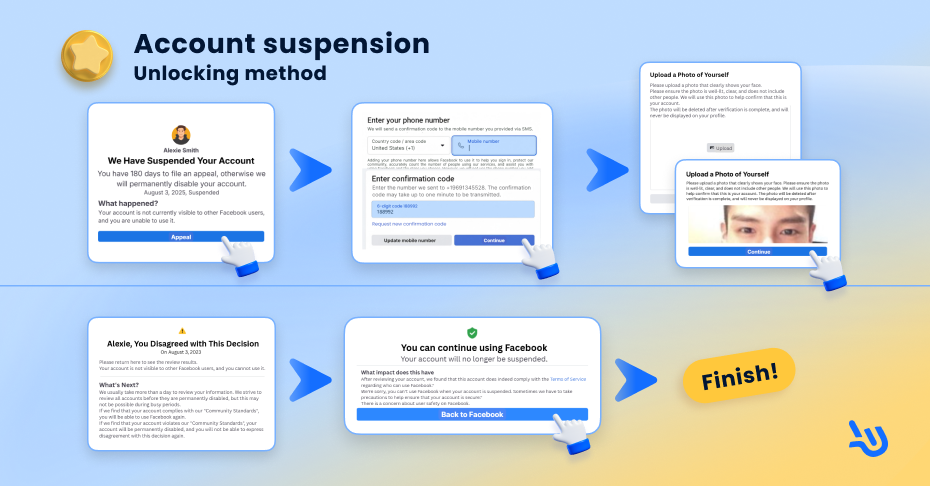
How to solve "Account Suspended"?
If you are suspended for policy violations, click “Request Review.” You will need to verify your phone number and upload a clear photo of yourself. Ensure the photo is high-quality and the details match your Facebook profile name.
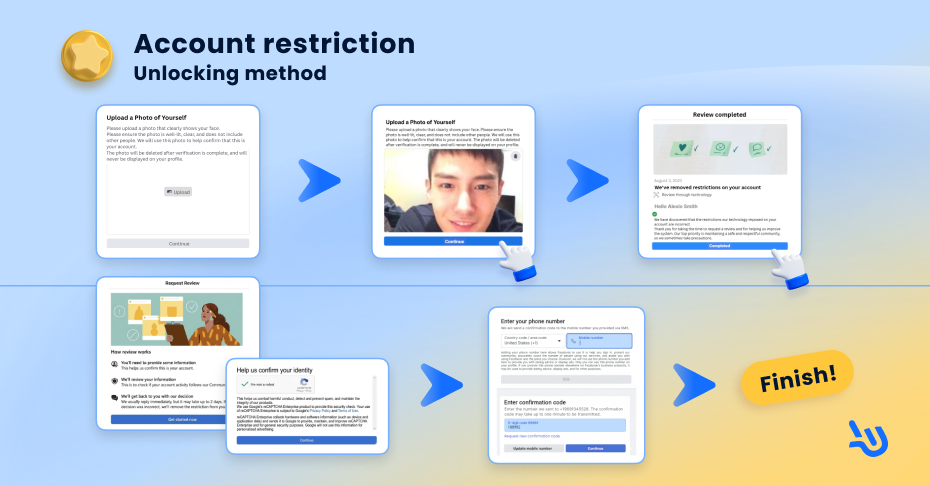
How to solve "Feature Limits"?
Restrictions usually last from 1 hour to 21 days.
- Check your “Account Status” to see the reason for the limit.
- You may “Request a Review” with photo ID.
- Pro Tip: Once restricted, leave the account completely static for at least 3 days. Do not attempt any actions, as repeated failed attempts can extend the penalty duration.
5 Expert Secrets to Prevent Facebook Bans
If you use marketing tools or conduct high-volume outreach, account maintenance is critical. Use these five secrets to minimize your risk:
1. Increase Posting Intervals
Avoid posting to dozens of groups within a single minute. Slow down your frequency to simulate real human behavior, which reduces the risk of being flagged as a bot by the algorithm.
2. Avoid Links; Use Messaging IDs
Facebook’s radar is highly sensitive to external links, especially repetitive URLs. Instead of posting a website link, use “Add me on WhatsApp/LINE” by leaving ID or direct users to your private messages (DM) to avoid being scanned as spam.
3. Stop Posting to "Unmoderated" Groups
Groups without active admins are often flooded with spam. Posting in these low-quality environments can negatively impact your account’s “health score” and lead to a ban.
4. Limit the Number of Logged-in Devices
Frequently switching between phones, tablets, and different IPs is a major trigger for “abnormal activity” locks. Stick to 1-2 trusted devices for the safest operation.
5. Rotate Your Content Regularly
Never use a single template for all your posts. Repetitive text and images are flagged as spam. Prepare 3-5 variations of your captions and images to keep your content diverse and “organic.”
Conclusion: Prevention is Better Than Cure
While a locked Facebook account is a major headache, most issues can be resolved by following the correct recovery steps. If you use marketing automation tools, adhering to these anti-ban strategies is vital for long-term success.
💡 Final Reminder: After recovering your account, immediately check your security settings and enable Two-Factor Authentication (2FA) for an extra layer of protection!